The head of marketing at a software company emailed us as he signed on for a pilot after growing tired of his results using Dialpad:
"Based on my Dialpad digging, it seems that our connect rate is 2%, so it won't be hard to triple it!"
His words, not ours: "Dialpad digging." He used Dialpad for outbound calling, and he still had to "dig" to find his connect rate.
If that doesn't tell you something's wrong...
But I'm not here to just rag on Dialpad. My point is just that it's not quite the sales-focused platform B2B sales teams need.
Here's the short version:
Dialpad is a cloud business phone system, in the same category as things like RingCentral, Aircall or 8x8. Dialpad Sell is how Dialpad packages that phone system for B2B sales teams. TitanX is a precision dialer built for the step before the conversation: knowing who will answer, and getting your reps into more of those conversations.
Dialpad Sell does have useful AI features, from live transcripts to call summaries to coaching cards. Those features start working after your rep is already speaking with a prospect. As our customer noted, that doesn't happen often when you cold call.
Our recommendation: if your reps mostly talk to people who expect their call, such as inbound leads, renewals and existing accounts, Dialpad is a solid business phone system your IT or operations team might want for the whole company, and Dialpad Sell adds useful coaching for those calls. If your reps book meetings by cold calling, you need a purpose-built sales dialer obsessively designed to deliver the maximum conversations with qualified prospects in the shortest time, with the fewest dials.
Below, we compare Dialpad Sell and TitanX on features, reviews, pricing, integrations and number health, using Dialpad's own pricing page and help center, public Dialpad Sell reviews, and what teams calling on Dialpad told us on intro calls.
What Dialpad is, and where Dialpad Sell fits
Dialpad is a company phone system. Sell packages it for B2B sales teams.
Dialpad sells four products that share one app and one admin console. As of November 6, 2026, Dialpad's pricing page lists:
- Dialpad Connect, its cloud business phone system: phone numbers, calling, texting and video meetings for every employee.
- Dialpad Support, its contact center software for customer service teams.
- Dialpad Sell, its software for sales teams.
- Dialpad Resolve, voice and chat AI agents that handle customer requests such as scheduling, call routing and order lookups on their own, billed per conversation.
Dialpad's pitch is "one AI platform for every conversation, workflow, and channel."
Each of the four is a separate plan. You could put a sales team on Connect alone, since it includes calling and CRM integrations on its Pro plan. But Dialpad's feature comparison shows no local presence or voicemail drop on Connect, so most outbound teams that pick Dialpad end up on Sell.
Sell is the product we compare with TitanX here.
Dialpad Sell comes in three plans. Only Premium includes Dialpad Dialer.
Prices are per user per month, as listed on November 6, 2026. Each is the full price of a Sell seat, calling included:
- Essentials, $39 annual or $49 monthly: unlimited US and Canada calling, AI transcripts and call summaries, PII redaction, Coaching Teams and one year of recordings.
- Advanced, $59 annual or $70 monthly: adds local presence, voicemail drop and live AI coaching during calls.
- Premium, $79 annual or $95 monthly: adds AI call scoring, AI Playbooks, a coaching hub and Dialpad Dialer (more on what exactly this is and how it's different in a minute).
Seems simple, but Dialpad is also playing the add-on game. For example, if you want basic outbound features like local presence, voicemail drop and live coaching on Essentials, you'll need to pay for them as add-ons. AI call scoring is an add-on on both Essentials and Advanced too. And no matter what plan you get, the local phone numbers behind local presence will cost you extra. How much extra, we don't know: Dialpad doesn't publish any add-on prices publicly.
Below Premium, it's click-to-call
On Essentials and Advanced, reps click to call one number at a time. There are three ways they can do that:
- The Dialpad app, on desktop, web or mobile, where a rep types or picks a number and calls it.
- The Dialpad Chrome extension, which highlights phone numbers on supported sites such as HubSpot, Zoho and Gmail so a rep can click one to call a contact or prospect record that's already on-screen.
- Click-to-call inside the CRM. In Salesforce Lightning, a rep clicks a number on a record to call it. In HubSpot, a rep opens a contact, selects the call icon, picks a number and confirms the caller ID before each call.
None of these work through a call list. Every call starts with a rep's click, and they need to navigate to a contact record first. Not exactly an efficient outbound workflow. Within the Dialpad app it's worse. Imagine calling all your contacts like this:

What an Essentials or Advanced rep sees just before placing a call in the Dialpad app. Source: Dialpad's How to Make a Phone Call from a Computer guide.
Dialpad Dialer is Sell Premium only
Dialpad Dialer, only available on Dialpad Sell's Premium plan, does give reps a way to just dial through a list in one place.
Here's how it works:
An admin loads a list into a campaign, and Dialpad Dialer works down it on its own, handing only answered calls to available reps. Dialpad calls it "a progressive outbound dialer" with "N:1 lines per agent," so an admin can have it ring several prospects at once for each rep. That basically means it's contact center machinery pointed at your contact list. It'll definitely get you through the list faster... but still wastes 80% of the calls you place on contacts who'll never pick up anyway.
And since you'll produce dialing patterns consistent with spam, it's likely to result in damage to the reputations of the numbers you're using.
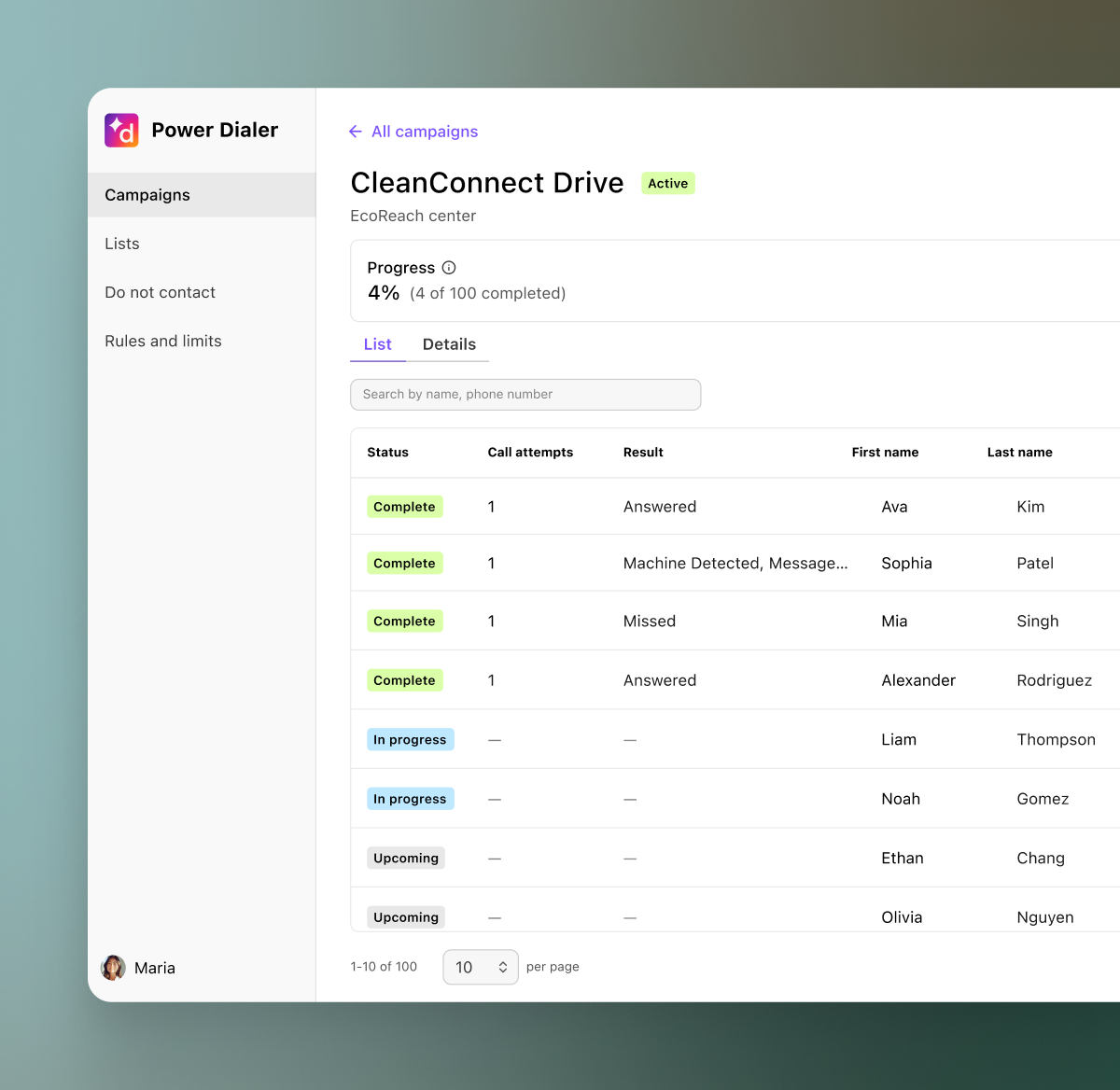
Dialpad Dialer campaign view: list progress, call attempts and results. Source: Dialpad's Power Dialer product page.
Dialpad Dialer only launched in May 2026, which makes list dialing one of the newest additions to a platform built first for company phones.
TitanX gives sales teams more, because sales is all we build for
TitanX is the precision dialer. It knows who will answer before you dial, so every rep has more real conversations. Everything in the product serves reps who book meetings by phone. We do not sell add-ons because the platform is designed to work as a whole specifically for the job of outbound sales.
Here's what's included in each TitanX Precision Dialer seat:
- Phone Intent™, a proprietary scoring model developed by TitanX that measures each person's behavioral propensity to answer a cold call.
- Best Phone, the number most likely to reach each contact.
- Smart Stream, one calling queue in priority order, with account and contact information to prepare reps before each dial, with follow-ups brought back automatically.
- Titan Defense, which keeps every number your reps call from trusted, with registration, monitoring, local presence and automatic remediation included.
- One-click voicemail drop. When a call hits voicemail, reps leave a prerecorded message and move straight to the next call.
- Coaching and reporting, including in-call coaching for managers, post-call feedback, and progress to goal by rep, team and campaign.
- Campaigns with Smart Scripts and battle cards.
- Native Salesforce and HubSpot sync.
We don't build phone systems for your finance team, help desk software or AI agents. Every product decision we make starts with the rep on the phone. The Precision Dialer is $475 per seat per month, paid annually, with a three-rep minimum, as listed on our pricing page.
Every Dialpad Sell plan vs TitanX, feature by feature
| Feature | Sell Essentials | Sell Advanced | Sell Premium | TitanX |
|---|---|---|---|---|
| Price per user per month, annual | $39 | $59 | $79 | $475, three-rep minimum |
| Know who will answer before the dial | Not available | Not available | Not available | Included: Phone Intent™ |
| Best number for each contact | Not available | Not available | Not available | Included: Best Phone |
| How reps place calls | One number at a time, by click-to-call | One number at a time, by click-to-call | Dialpad Dialer: progressive list dialing, several lines per rep | Precision Dialer: single-line, from a ranked queue |
| Queue ranked by who will answer, with automatic follow-ups | Not available | Not available | Not available | Included: Smart Stream |
| Local presence | Paid add-on; numbers sold separately | Included; numbers sold separately | Included; numbers sold separately | Included in Titan Defense |
| Voicemail drop | Paid add-on | Included | Included | Included: one-click voicemail drop |
| Managers listen, whisper or barge in | Included | Included | Included | Included: in-call coaching for managers |
| AI coaching cards during calls | $$ Paid add-on | Included | Included | AI guidance for reps and leaders, included |
| AI call scoring and playbooks | $$ Paid add-on | $$ Paid add-on | Included | AI call scoring, guidance for reps and leaders, included |
| Transcripts and AI call summaries | Included | Included | Included | AI guidance for reps and leaders, included |
| Number registration and spam remediation | Caller Trust Guard, $2 per number per month (early adopter program) | $2 per number per month | $2 per number per month | Included: Titan Defense |
| Dialpad Dialer minutes | No Dialpad Dialer | No Dialpad Dialer | $0.02 per outbound minute | Included: priced per seat, not by usage |
| CRM | Salesforce, HubSpot, Zoho | Same | Same | Native Salesforce and HubSpot sync |
Sources: dialpad.com/pricing, Dialpad's feature comparison, rates page and spam help article, read November 6, 2026; titanx.io.
Features: Dialpad Sell's AI works on the conversation. TitanX works on who answers.
Dialpad Sell helps once a prospect picks up
Dialpad Sell does its best work during and after a live call. On every plan, reps get real-time transcripts, AI call summaries with action items, and speech coaching that flags habits like talking too fast. On Advanced and Premium, reps see talking points on screen when a prospect mentions a competitor or raises an objection. On Premium, managers can score calls with AI scorecards and check whether reps followed a method like BANT or SPIN.
Managers on every Sell plan can listen in, barge in or take over a live call. Since May 2026, Dialpad's live dashboard has also shown connection rates and calls per hour in real time. If you want your managers to coach the calls your reps already have, Dialpad Sell does that well, starting at $39.Live coaching sidebar and call controls during a Dialpad Sell call. Source: Dialpad's Sales Dialer page.
Roughly 20% of any market answers a cold call, and Phone Intent shows reps who
Across over 100 million phone numbers, hundreds of sub-industries and thousands of job titles, roughly 20% of any market will answer a cold call. The other 80% won't, whatever the frequency, timing or number rotation. It's a fixed pattern of human behavior, and no dialer setting changes it.
Reps who call the whole list are dialing blind. They spend the same effort on someone who will never pick up as on someone who answers unknown numbers every week. With Phone Intent, your reps know the reachable 20% before they dial. They call those prospects first and reach everyone else by email, LinkedIn and marketing.
We checked every row of Dialpad's feature comparison and found nothing that predicts who will answer. Dialpad Sell's AI starts work when the call connects. Phone Intent does its work before the rep dials.

Before the dial in TitanX: the contact's Phone Intent bucket (P1 High Intent), the Best Phone number to call, a smart summary and battlecards. The rep places the call, one line at a time.
Dialpad Dialer can call several lines per rep. TitanX calls one.
With Dialpad Dialer, an admin sets how many lines to dial for each available rep, and Dialpad Dialer connects each answered call to whichever rep is free. Campaigns dial from a Contact Center queue and last up to seven days, according to Dialpad's campaign settings article.
If more prospects answer than there are free reps, the same article says, "this message plays before the call disconnects." Your prospect picked up and got a recording.
TitanX is single-line only, and never parallel. A rep places every call. We rank each rep's queue in real time by Phone Intent score, account status, activity history and progress to goal. When a rep logs a disposition, we create the follow-up task and move it back to the top of the queue on its due date. Smart Stream is deterministic and event-driven, not AI, and TitanX is built to be TCPA-conscious and human-initiated.
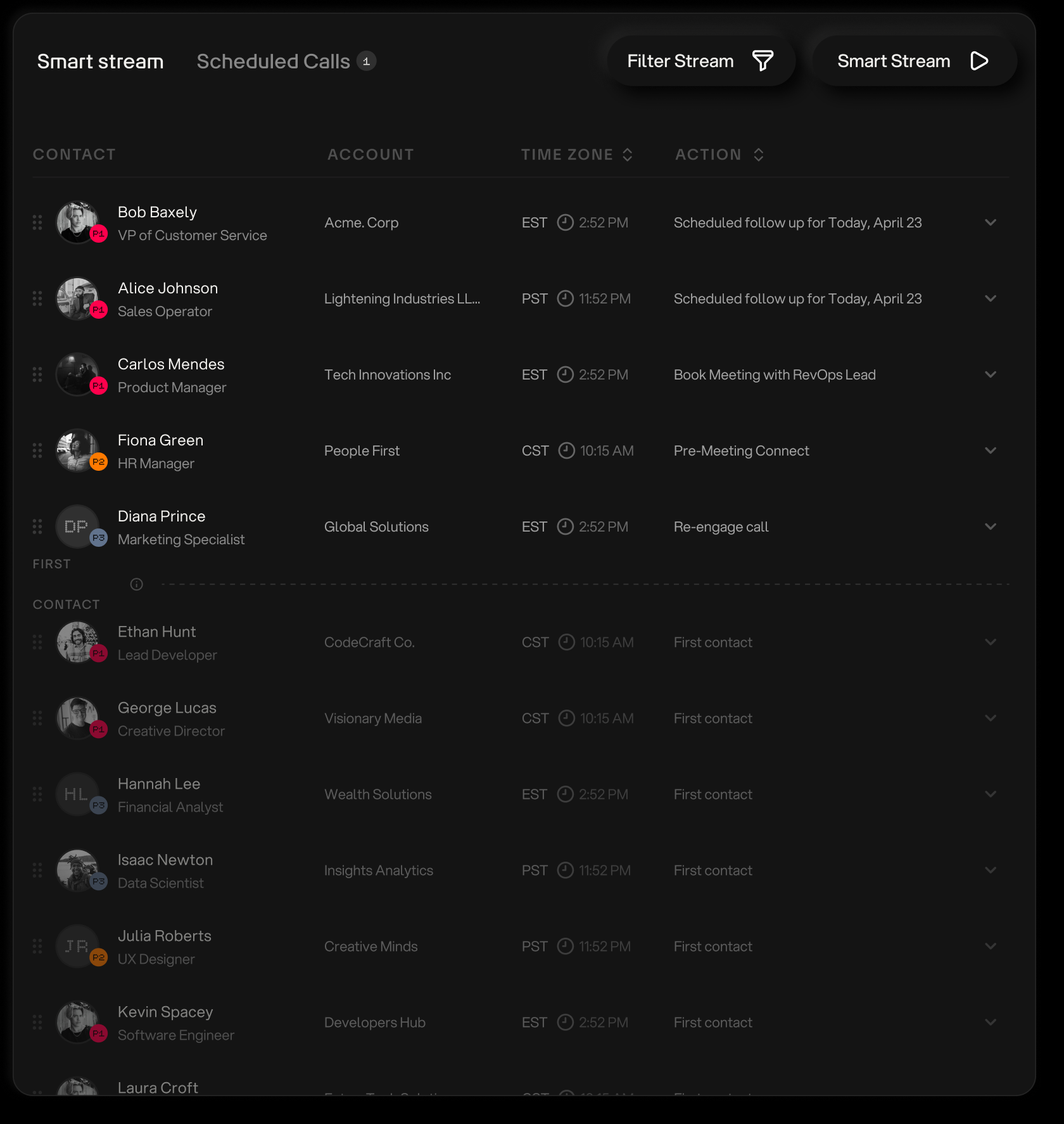
Smart Stream: each rep's queue, with due follow-ups first and every contact tagged by Phone Intent bucket (P1, P2, P3).
Reviews: most Dialpad Sell reviewers aren't in sales
Most of the people reviewing Dialpad Sell aren't in sales.
Dialpad Sell scores 8.6 out of 10 on TrustRadius, from 47 ratings. Reviewers like the automatic call recording, live transcripts, call quality and easy setup. Their complaints are lag, freezes and dropped connections, especially after updates, plus calls they have to link to CRM records by hand and missing features such as an autocalling mode.
Only four of the 24 reviewers work in sales, and all four posted in March 2024 or earlier, so we haven't quoted them. None of the 24 reviews mentions a measured change in connect rate or meetings booked, and all of them came out before Dialpad Dialer launched.
Pricing: Dialpad Sell is cheap on seats. Price what it takes to match TitanX.
Dialpad Sell's seat price leaves out most of what an outbound team needs. To compare fairly, we priced Dialpad Sell as close to a TitanX seat as Dialpad's published prices allow.
Our assumptions
- 10 reps in the US, on annual billing.
- Sell Premium, the only Sell plan with Dialpad Dialer and with AI call scoring included.
- Each rep dials about 100 times a day, 21 days a month. We count each dial as one billed minute, or about 2,000 minutes per rep per month. Dialpad's feature comparison says Sell's unlimited domestic minutes exclude Dialpad Dialer minutes, and its rates page charges Sell seats $0.02 per outbound minute.
- Three numbers per rep, each enrolled in Caller Trust Guard, Dialpad's monitoring and spam remediation service, at $2 per number per month.
- We left out branded caller ID, which Dialpad sells through third-party partners on quote.
What Dialpad Sell costs with everything added
| Cost, 10 reps, one year | Dialpad Sell Premium | TitanX |
|---|---|---|
| Seats | $9,480 | $57,000 |
| Dialpad Dialer minutes | $4,800 | Included: priced per seat, not by usage |
| Spam monitoring and remediation | $720 | Included in Titan Defense |
| Local phone numbers for local presence | Quote only | Included in Titan Defense |
| Extra numbers beyond each rep's line | Quote only | Included in Titan Defense |
| Published total | $15,000, or $125 per rep per month, before quotes | $57,000, or $475 per rep per month |
What you still can't get on Dialpad Sell
After every upgrade and add-on, a Dialpad Sell team still doesn't have:
- A way to know who will answer before the dial. Nothing in Dialpad's feature comparison scores contacts by how likely they are to pick up.
- The best number for each contact. Reps dial whatever number sits in the CRM.
- A queue ranked by who will answer. Dialpad Dialer works through a list, and it can call several prospects per rep.
- A rep on every answered call. With more than one line per rep, a prospect who answers when no rep is free hears a recorded message.
- Number health your team doesn't have to manage. Caller Trust Guard is in an early adopter program, covers eligible US numbers only, and needs a company admin to verify the business and enroll each number.
Seat price is the wrong denominator
An outbound team should measure cost against conversations, because conversations turn into meetings. TitanX customers have raised connect rates from as low as 3% to 30% and higher. Aldridge went from 3% to 30% in two weeks. At Park Place Technologies, connect rates climbed from as low as 4% to 22%, and AEs went from 320+ dials per meeting to 84.
If your reps book meetings by phone, figure out what one meeting costs you in rep hours today, and compare that.

TitanX end-of-session view: calls, connects, conversations and meetings for the session, plus feedback on what the rep's best calls had in common.
Integrations: both connect to Salesforce and HubSpot
Dialpad Sell works with Salesforce, HubSpot and Zoho, and Dialpad's sales dialer page adds Outreach and Gong. Reps can click to call from inside the CRM, and Dialpad logs calls and texts to the record. Admins can pull Dialpad Dialer lists from Salesforce. HubSpot teams load them from CSV files or the API.
Dialpad users have complained, to us and in reviews, that logging calls is hard. The head of business development at a company that sells to small-business owners described the HubSpot connection on an intro call in May 2026: "you're running a sequence that has like a modal, it pops up. The modal occasionally loads. Sometimes it doesn't load." A sales account manager on TrustRadius wrote that they had to link calls to Salesforce records by hand.
TitanX syncs natively with Salesforce and HubSpot. We pull contacts in continuously and write Phone Intent scores and dispositions back, so your leaders can report on results in the CRM they already use.
Number Health: On Dialpad Sell, It's Your Problem
Registering and protecting numbers is an admin's job
Dialpad's Local Presence article states the rule plainly: "To avoid spam labeling, all local presence numbers must be registered." Your team does the registering. Dialpad's spam help article gives customers two options when a number gets flagged: register numbers and file remediation requests with each analytics provider yourself, or pay for Caller Trust Protection.
Caller Trust Protection is new, and Dialpad lists it under an early adopter program. A company admin has to complete business verification first, which "typically takes 2–4 business days," then enroll each number. Caller Trust Restore costs $2 per number, once. Caller Trust Guard costs $2 per number per month and monitors numbers continuously. Dialpad's own caveat: registration "doesn't guarantee that your calls won't be flagged."
Local Presence also covers less than its name suggests. It applies only to Contact Center and Coaching Team group calls, not reps' personal lines, and only to US numbers.
Dialpad's advice conflicts with how outbound teams call
The same help article lists what makes a number more likely to get a spam label. Two items on that list describe outbound work: making "a high volume of outbound calls with low answer rates," and a sudden jump in calling volume, like the one a team makes when it turns on Dialpad Dialer. Dialpad Dialer at several lines per rep, on a list with a single-digit connect rate, fits both.
A team can call from a flagged number without knowing it
At an outbound agency's pilot kickoff in July 2026, our technical account manager tested a rep's Dialpad number live, on the call. The number came back as "potential spam on TNS," and a test call returned "the number you dialed cannot be reached." Nobody at the agency had known. As our technical account manager put it, "no amount of high intent is going to fix that problem."
A senior sales leader at a security software company told us the same thing in March 2026: "Sometimes we come up as spam, sometimes we don't so it's hard to, it's hard to really say where the connectivity issues come into play." When carriers block a flagged number's calls, the rep just logs another unanswered dial.
Titan Defense registers, monitors and repairs every number
Titan Defense is our number-health system, and every Precision Dialer seat includes it. We carrier-register numbers with STIR/SHAKEN attestation before the first dial and monitor them continuously. When a number gets flagged, we pull it out of rotation automatically and remediate it with the carriers. Reps place high-intent calls from their own registered numbers, and since there's no caller-ID picker, no rep can burn a number by accident.
Across about 45,000 numbers, we're at 0% spam right now. Nobody can avoid spam permanently, because carriers keep changing their analytics, and we adjust our protocols to match. It's ongoing work, and we do it so your team doesn't have to.
What teams calling on Dialpad told us about connect rates
Between May 2025 and August 2026, 16 prospects told us on intro calls that Dialpad was their calling tool, and 12 gave us a connect rate. Their rates ranged from 2% to 12%, with a median of about 6%. Across all 1,312 of our 1,780 intro calls between March 2025 and October 2026 where a prospect gave a connect rate, the median was 5%.
Prospects reported these figures themselves, and 16 teams is a small sample. Still, teams on Dialpad gave us the same connect rates as everyone else. An SDR team lead at a legal software company told us in May 2025 that the team's reps made about 40 dials a day for two or three conversations, and that on some days "my guys are like, man, I, this is the first day ... where I've gotten nobody to pick up the phone."
Four of the 16 couldn't give a connect rate at all. A trucking company's VP of Sales guessed "probably terrible."
Who should choose Dialpad Sell
Dialpad Sell is the better choice for some teams. If one of these describes yours, choose Dialpad Sell.
Your reps mostly talk to people who expect the call
If your reps work inbound leads, renewals and existing accounts, most of their calls already connect. Dialpad Sell's transcripts, call summaries and live coaching help with those conversations, from $39 a seat.
You want one vendor for every department's phones
With Dialpad, sales, support, finance and the front desk share one app and one admin console.
Your managers coach from call recordings
If your managers want to score calls and coach to a method, Sell Premium gives them AI scorecards and Playbooks for $79 a seat.
Fewer than three reps make cold calls every day
We don't build TitanX for teams with fewer than three reps on the phone every day, and we'd tell you so on the first call.
Who should choose TitanX
Choose TitanX if three or more of your reps book meetings by cold calling and your connect rate is in single digits. It's also the better fit if your numbers keep getting flagged and nobody on your team has time to fix them, or if you want a rep to place every call, one line at a time.
That head of marketing found his 2% by digging through Dialpad. Before your next Dialpad Sell renewal, pull your own connect rate for the last 90 days. If it's in single digits, more coaching won't fix it. Your reps need to know who will answer, and they need numbers prospects trust.
TitanX offers a pilot. It's free when you give us an export of dial logs from your current dialer and set up an executive alignment call.
See who on your list will answer: book a TitanX demo
Dialpad Sell vs TitanX: quick answers
Does Dialpad Sell have a power dialer?
Only on Premium. Sell Premium includes Dialpad Dialer, Dialpad's progressive list dialer. Reps on Sell Essentials and Advanced click to call one number at a time. Dialpad's older Salesforce Powerdialer is now a legacy feature marked "N/A" on every Sell plan.
Is Dialpad Dialer a parallel dialer?
Dialpad calls it a progressive dialer with "N:1 lines per agent." When an admin sets more than one line per rep, Dialpad Dialer calls several prospects at once for each available rep, and a prospect who answers when no rep is free hears a recorded message before the call disconnects. TitanX is single-line only, and a rep places every call.
Do I need Dialpad Connect to buy Dialpad Sell?
No. Dialpad sells each product on its own plan. Connect alone doesn't include local presence or voicemail drop, though.
What's the difference between Dialpad Sell Essentials, Advanced and Premium?
Essentials ($39) covers calling, transcripts, AI call summaries and Coaching Teams. Advanced ($59) adds local presence, voicemail drop and live coaching. Premium ($79) adds AI scorecards, AI Playbooks and Dialpad Dialer. Those are annual prices per user per month, as listed on November 6, 2026. Monthly billing costs $49, $70 and $95.
How do Dialpad Sell and TitanX pricing compare?
Dialpad Sell costs $39 to $79 per user per month on annual billing. Dialpad Dialer minutes, spam monitoring and the local numbers behind local presence cost extra. In our 10-rep example, Sell Premium came to about $125 per rep per month before the quote-only items. The TitanX Precision Dialer is $475 per seat per month, paid annually, with a three-rep minimum, and includes Phone Intent, Best Phone, Smart Stream and Titan Defense.
Does Dialpad Sell stop calls from showing as "Spam Likely"?
Dialpad says all local presence numbers must be registered to avoid spam labels. Customers can register numbers with each analytics provider themselves or pay $2 per number per month for Caller Trust Guard, which is in an early adopter program. On TitanX, Titan Defense registers, monitors and remediates every number as part of the seat.
Can TitanX replace Dialpad for the whole company?
No. We build a dialer for reps who sell by phone. Keep Dialpad Connect or Support for the rest of the company.
Can we keep Dialpad Sell and use Phone Intent scores?
Yes. With standalone Phone Intent, we score the contacts in your CRM, and your reps call them from Dialpad. Your reps will know who to call, which beats dialing blind. You give up Titan Defense and Smart Stream, so number health and the daily calling workflow stay with your team.

Staunch advocate for conversation-led growth, known for bringing scientific rigor to go-to-market models.


Continue Reading


100x more sales tech. Half the success.